Choosing a CRM for immigration consultants is one of the few decisions that touches every part of your agency: how leads are followed up, how documents are collected, how deadlines are met and how quickly you get paid. Pick well and your team spends its time on cases. Pick badly and you end up running the real business in WhatsApp and Excel anyway — with an expensive tool on the side.
This buyer's guide walks through what an immigration CRM should do, how it differs from a generic sales CRM, the questions to ask before you pay, and a simple 30-day plan to roll it out without disrupting clients.
What is an immigration CRM?
A generic CRM is built around a sales funnel: a contact becomes a deal, the deal is won or lost, and the story ends. Immigration work starts where that story ends. Once a client signs, you still have weeks or months of document collection, form preparation, submissions, biometrics, embassy follow-ups and decisions — often for several family members at once.
An immigration CRM (sometimes called immigration case management software) is designed for that second half. Instead of "deals", it tracks cases: a client, a visa type, a destination country, a set of required documents, a timeline and a decision. It still handles leads and sales, but the core of the product is the case file.
10 features to look for in a CRM for immigration consultants
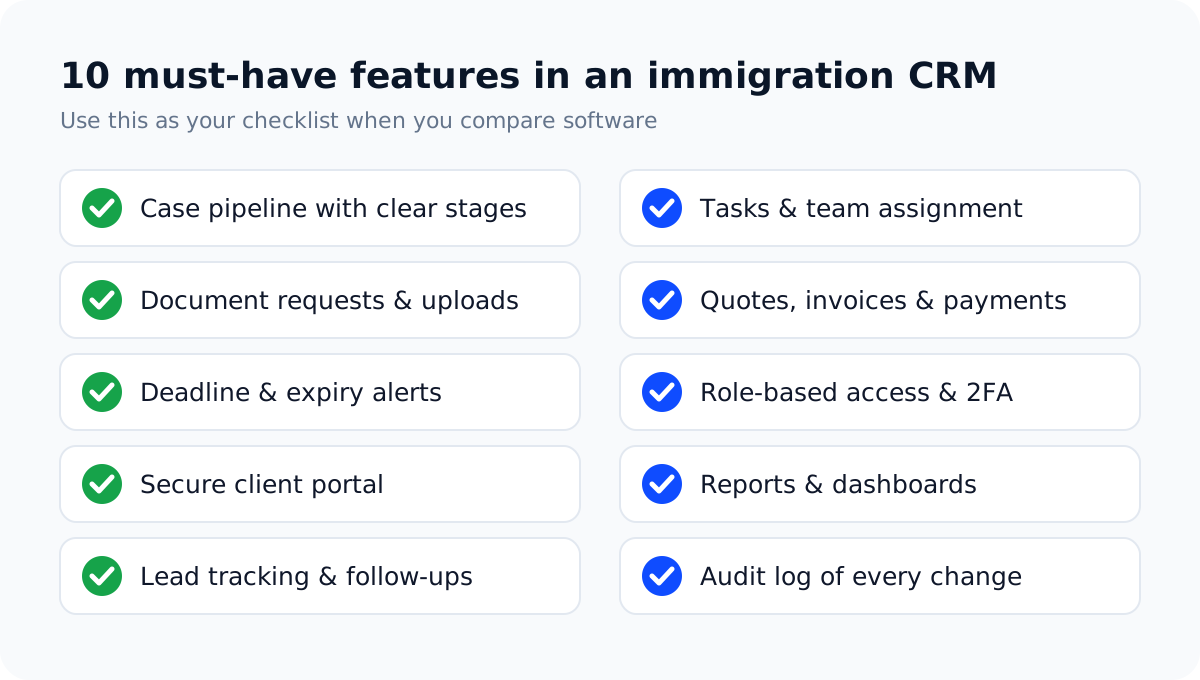
1. A case pipeline with clear stages
You should be able to see every active case on one board, grouped by stage — for example consultation, collecting documents, submitted, decision. If you can't answer "how many files are waiting on the client right now?" in ten seconds, the tool isn't doing its job. We cover how to design these stages in our guide to tracking visa applications for 100+ clients.
2. Document requests and secure uploads
Most delays in immigration files come from missing or wrong documents. Look for a way to request a specific document from a client, give them a secure upload link with a due date, and then approve or reject the upload with a reason. Documents should live inside the case — not in someone's email attachments.
3. Deadline and expiry alerts
Passports, visas, English test scores and offer letters all expire. A good system stores these dates per case and warns you well before they become a problem. Our article on passport and visa expiry tracking shows a reminder schedule that works.
4. A secure client portal
The single biggest time-saver for most agencies is letting clients check their own status. A portal where clients log in to see their application stage, upload requested documents and pay invoices removes a large share of "any update?" messages. Read more in why your firm needs a client portal.
5. Lead tracking and follow-ups
Every inquiry — from your website, a walk-in, a referral or a seminar — should be captured with its source and assigned to someone. A simple kanban board (new, contacted, consultation booked, converted, lost) is usually enough, as long as nothing sits untouched.
6. Tasks and team assignment
Each case needs an owner and a next action. Tasks with due dates, assigned to a named person, turn "someone should call the embassy" into "Sara calls the embassy by Thursday".
7. Quotes, invoices and online payments
Your CRM should let you send a written quote, convert the work into invoices (ideally per milestone) and share an online payment link. Seeing unpaid invoices next to the case makes chasing payments far less awkward.
8. Role-based access, two-factor login and an audit log
You hold passports, bank statements and family records. Staff should only see what their role needs, logins should be protected with a one-time code, and every important change should be recorded with who made it and when.
9. Reports and dashboards
At minimum: cases by stage, new leads by source, revenue collected and outstanding, and overdue tasks. These numbers tell you where files are getting stuck and which marketing channels actually bring clients.
10. Room to grow
If you plan to add staff or open a second office, check how the price and permissions change. Multi-branch support, team limits and data export matter more than they seem on day one.
Generic CRM vs immigration-specific CRM
Many agencies try a general-purpose CRM first. That can work if you have time and budget to customise it, but the trade-offs are worth knowing:
| What you need | Generic sales CRM | Immigration CRM |
|---|---|---|
| Case stages after the sale | Custom build required | Built in |
| Document checklists per visa type | Add-ons or custom fields | Built in |
| Passport and visa expiry dates | Custom fields, manual reminders | Tracked with alerts |
| Client portal for case status | Usually a separate product | Included on most plans |
| Setup time | Weeks of configuration | Days |
| Cost of change | Consultant or admin needed | Mostly self-serve |
Generic CRMs shine for pure sales teams. If most of your work happens after the client signs, a purpose-built tool usually costs less in the long run because you are not paying to rebuild immigration workflows.
Questions to ask before you buy
- Can I export all my data? You should be able to download clients and cases as CSV at any time.
- How is pricing calculated? Per user, per case or flat? Check what happens when you hire your next two staff members.
- Is there a free trial on real data? A week with your own cases tells you more than any demo.
- Can I import from Excel? Moving your existing client list should take an afternoon, not a project.
- What does the client see? Ask to log in as a test client. If the portal confuses you, it will confuse them.
- How are logins protected? Look for one-time codes or authenticator apps, and the ability to restrict access by IP for staff.
- Who supports you? Find out how fast support answers and whether onboarding help is included.
Match the plan to the size of your agency
Your needs change as you grow, so it helps to think in three stages:
- Solo consultant or small office (1–5 people): you need a clean case pipeline, document requests, invoices and reminders. Keep it simple.
- Growing agency (5–15 people): add a client portal, bulk messaging, workflow automation and reports by team member.
- Multi-branch agency: branch-level permissions, e-signatures, white-label branding and API access start to matter.
As an example, VisaPilot CRM's plans follow the same shape: Starter covers up to 300 applications a month and 5 team members, Growth adds unlimited applications, a client portal and bulk messaging for up to 15 team members, and Agency adds multi-branch management, e-signatures, white label and API access. Whichever tool you choose, buy for the next 12 months — not the next five years.
A 30-day rollout plan
- Week 1 — Import and clean up. Import your client list from Excel, remove duplicates and agree on naming (full name as on passport).
- Week 2 — Pipeline and checklists. Set up your case stages and a document checklist for your three most common visa types.
- Week 3 — Team. Invite staff with the right roles, assign every active case an owner and move all new cases into the CRM only.
- Week 4 — Clients and money. Turn on the client portal, send invoices from the system and start a weekly 15-minute pipeline review.
The rule that makes any CRM work: if it isn't in the system, it didn't happen. Agree on it as a team on day one.
Frequently asked questions
Does a small visa agency really need a CRM?
If you handle more than a handful of active files, yes. The cost of one missed deadline or lost document usually exceeds a year of software. Small agencies benefit most because they have no spare staff to absorb chaos.
Can I keep using WhatsApp with a CRM?
Yes — keep WhatsApp for quick conversations, but store documents, statuses and decisions in the CRM. We compare both approaches in WhatsApp and Excel vs a visa agency CRM.
How long does it take to set up?
With an immigration-specific tool, most agencies are working in it within a week. The 30-day plan above gets the whole team and your clients on board.
Is client data safe in the cloud?
It can be safer than files on personal phones and laptops — provided the provider uses encrypted connections, per-user logins with one-time codes, role-based access and audit logs. Ask every vendor about these before you sign.
Ready to see how this works on your own cases? Start a 7-day free trial of VisaPilot CRM or book a short demo and we'll walk through your workflow with you.
Run your visa agency from one dashboard
Cases, documents, deadlines, invoices and a client portal — built for immigration consultants. Try VisaPilot CRM free for 7 days.
Start free trial or book a demo →