Almost every visa agency starts the same way: client conversations on WhatsApp, a shared Excel sheet for case status, and documents scattered across phones and email. It's free, everyone knows how to use it, and for the first few clients it works. The question isn't whether WhatsApp and Excel are bad — it's when they start costing more than a proper visa agency CRM.
This article looks at the hidden costs of running an agency on chats and spreadsheets, the signs you've outgrown them, and how to switch without disrupting a single client.
Why agencies start on WhatsApp and Excel
There are good reasons:
- Clients already use WhatsApp and expect quick replies there.
- Excel is flexible — you can add a column for anything in seconds.
- There's no cost and nothing new to learn.
For a solo consultant with a handful of files, that's a perfectly sensible setup. The problems appear gradually as clients, staff and deadlines multiply.
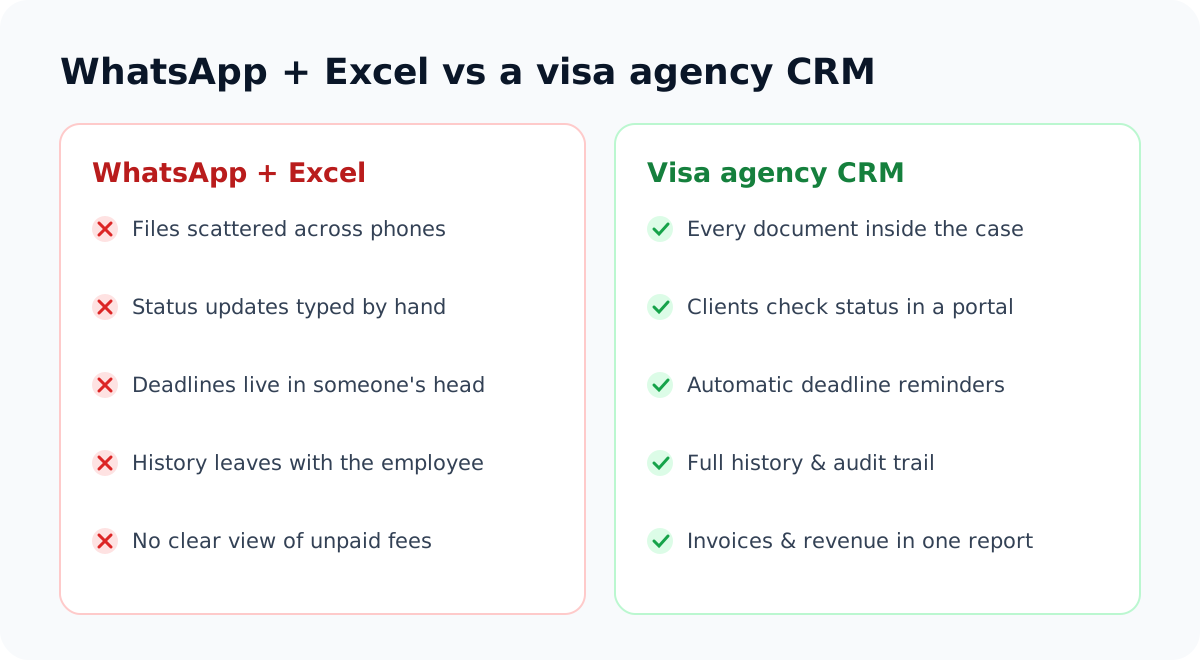
The hidden costs of running on chats
1. Time lost answering "any update?"
Status questions are the most common message most agencies receive. Here's an illustrative calculation: if you have 80 active clients and each asks for an update twice a week, and each reply takes three minutes to look up and type, that's around eight hours of staff time every week — a full working day spent repeating information that already exists.
2. Lost and duplicated documents
A passport scan sent on WhatsApp three weeks ago is hard to find, easy to download twice in different versions, and easy to forget. Teams end up asking clients for the same document again, which looks unprofessional.
3. Deadlines that live in someone's head
A spreadsheet can store a date, but it won't remind anyone. Biometric appointments, document due dates and passport expiries are only as safe as the memory of whoever entered them.
4. History that leaves with your staff
When a counsellor leaves, their WhatsApp chats — and the full history of every client they handled — often leave too. The next person starts from scratch.
5. Data protection risk
Passports, bank statements and family records sitting on personal phones are hard to protect and impossible to audit. A lost phone can expose dozens of clients.
6. No clear view of the money
When invoices are tracked in a separate sheet, unpaid fees slip through. Knowing exactly who owes what — at a glance — directly affects cash flow.
Signs you've outgrown WhatsApp and Excel
- More than one person updates the case spreadsheet.
- You've asked a client for the same document twice.
- Someone has missed an appointment or deadline in the last three months.
- You can't say, right now, which files are waiting on clients.
- Status updates take a noticeable part of the team's day.
- You don't know your total unpaid fees without adding them up manually.
If you ticked two or more, the hidden costs are probably already larger than the price of a CRM.
What changes with a visa agency CRM
| Problem | How a CRM solves it |
|---|---|
| Constant status questions | Clients see their stage in a client portal |
| Documents scattered everywhere | Every document is requested and stored inside the case |
| Forgotten deadlines | Due dates, appointments and expiry dates are tracked and flagged |
| History lost when staff leave | Notes, communications and changes stay with the case, with an audit trail |
| Data on personal phones | Individual logins with one-time codes and role-based access |
| Unclear finances | Quotes, invoices and payments linked to each client |
For a full feature checklist, see our buyer's guide to CRMs for immigration consultants.
Keep WhatsApp for conversations — move records to the CRM
You don't have to ban WhatsApp. Clients like it, and it's great for quick questions. The trick is to separate conversation from record:
- Chat on WhatsApp if the client prefers it.
- Ask for documents through a secure upload link, not as chat attachments.
- Log important calls and decisions in the case's communication log.
- Point clients to the portal for status, invoices and outstanding documents.
How to switch without disrupting clients
- Import your client list from Excel or CSV in one go.
- Start every new case in the CRM from a set date — no exceptions.
- Move active cases next, starting with those closest to a deadline.
- Train the team for one hour on stages, tasks and document requests.
- Tell clients about the portal with a short message and a one-page guide.
- Archive the old spreadsheet after a month so nobody updates two systems.
A message to tell clients about the change
Hi Fatima, we're upgrading how we manage your visa file. From Monday, please upload documents using the secure link we send — not on WhatsApp — so they're stored safely inside your case. You'll also get access to a client portal where you can see your application status any time. You can still message us here for quick questions. Thank you! — Your Agency Name
Most agencies complete the switch within a few weeks. The tracking system we describe in how to track visa applications for 100+ clients gives you a ready-made structure to follow.
The goal isn't more software. It's one place where every member of your team — and every client — can find the truth about a case.
Frequently asked questions
Can a small agency afford a CRM?
Plans for small agencies typically cost less than a few hours of staff time per month. If a CRM saves even one missed deadline or a few hours of status replies a week, it pays for itself.
Will clients be willing to use a portal?
Most clients appreciate being able to check status and upload documents whenever they want. Keep the login simple, send a short guide, and keep the portal up to date — clients only stop using it if it's out of date. Read more in our client portal guide.
What happens to our old WhatsApp history?
Keep it for reference, and copy anything important — decisions, agreements, key dates — into the case notes as you migrate each file.
How long does it take to move from Excel to a CRM?
Importing clients takes minutes. Moving active cases and training the team usually takes two to four weeks if you migrate gradually.
See what your agency looks like with everything in one place: start a 7-day free trial of VisaPilot CRM or compare plans.
Run your visa agency from one dashboard
Cases, documents, deadlines, invoices and a client portal — built for immigration consultants. Try VisaPilot CRM free for 7 days.
Start free trial or book a demo →