At twenty clients, a spreadsheet and a good memory feel like enough. At a hundred, they quietly stop working: two people update the same row, a document request slips, a biometrics appointment is missed, and nobody notices until the client calls. Reliable visa application tracking is less about software and more about a few clear rules — software just makes those rules effortless to follow.
Here is a five-step system agencies use to track 100+ active visa applications without losing a file, plus the numbers worth watching every week.
Why spreadsheets break as you grow
- No single source of truth. Copies of the sheet live in email, on laptops and on phones.
- No owner per case. A row doesn't tell you who is responsible for the next step.
- No reminders. A date in a cell doesn't warn anyone when it's getting close.
- Documents live elsewhere. The sheet says "bank statement received" — but where is it?
- No history. When someone changes a status, you can't see who did it or why.
If any of these sound familiar, you're not alone — it's the most common reason agencies move to a case management system. We compare the two approaches in detail in WhatsApp and Excel vs a visa agency CRM.
Step 1: Define clear case stages
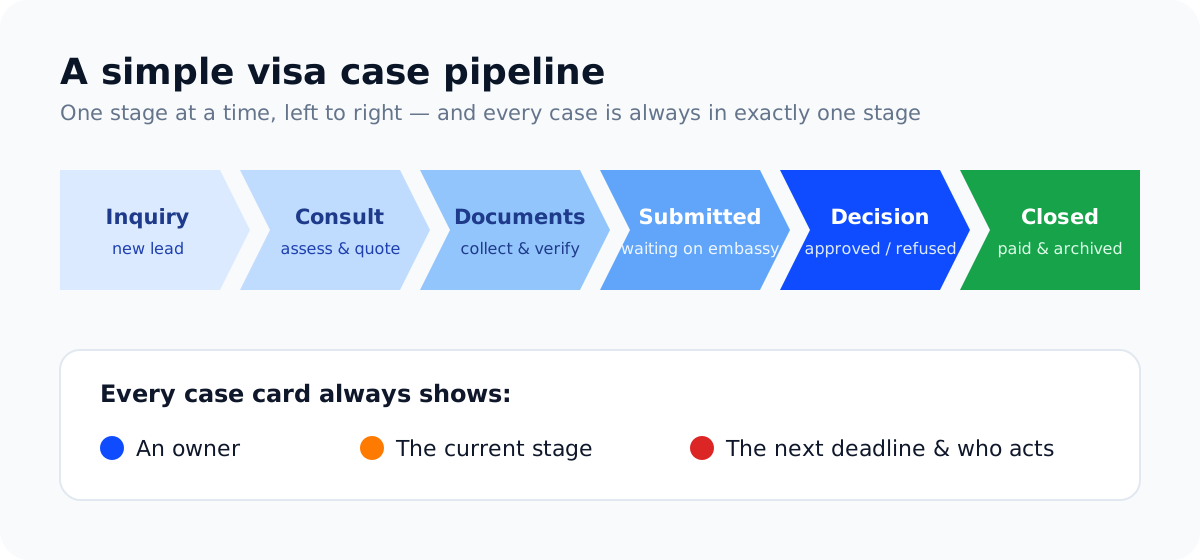
Stages only help if everyone agrees what they mean. Define an entry and exit rule for each one:
| Stage | Enters when… | Leaves when… |
|---|---|---|
| Inquiry | A lead contacts you | A consultation is booked or the lead is closed |
| Consultation | Assessment is scheduled | The client signs the agreement and pays the first milestone |
| Collecting documents | The agreement is signed | Every required document is received and verified |
| Submitted | The application is lodged | A decision is received |
| Decision | Approval or refusal arrives | The client is informed and next steps are agreed |
| Closed | All work and payments are complete | — (archived, but kept for expiry reminders) |
Keep the number of stages small. Six to eight is plenty; more than that and staff start skipping them.
Step 2: Give every case an owner and a next action
Every active case should answer three questions at a glance: who owns it, what happens next, and by when. If a case has no next action, it's either finished or forgotten.
- Assign an owner the moment a client signs.
- Create a task with a due date for the next step ("Request sponsor letter — Friday").
- When the owner is away, reassign — don't let files wait for someone's return.
Step 3: Track deadlines, not just statuses
A status tells you where a file is. A deadline tells you when it becomes a problem. Track these dates on every case:
- Document due dates you've given the client
- Appointment dates — biometrics, interviews, medical exams
- Submission deadlines, such as intake dates or job start dates
- Expiry dates of passports, visas, test scores and offer letters — see our expiry tracking guide
- Expected decision dates, so you know when to follow up
Then set a target number of days for each stage (for example, "documents collected within 14 days"). Cases that exceed the target are the ones to look at first.
Step 4: Run a 15-minute weekly pipeline review
Once a week, review the board as a team. Keep it short and always ask the same questions:
- Which cases have been in the same stage longer than the target?
- Which clients owe us documents, and have they been reminded?
- Which deadlines fall in the next 14 days?
- Which decisions are overdue for a follow-up?
- Which invoices are unpaid?
The weekly review is where tracking turns into action. Fifteen minutes a week prevents most of the emergencies that eat whole days.
Step 5: Let clients see their own status
When clients can log in and see their stage, outstanding documents and invoices, they stop calling to ask — and they upload documents faster because they can see exactly what's missing. It's the easiest way to cut interruptions as your client base grows. More in our guide to client portals for immigration firms.
A status update clients actually understand
Whether you update clients by portal, email or WhatsApp, use the same simple structure every time — what happened, what happens next, and whether you need anything from them:
Hi Imran, good news: your visitor visa application was submitted to the embassy today. Next step: your biometrics appointment on 22 April at 10:30 — please bring your passport and appointment letter. Nothing else is needed from you right now. Typical processing for this route is a few weeks; we'll update you as soon as there's news.
Clients who receive updates like this ask far fewer follow-up questions, because the three things they want to know are always answered.
The numbers worth watching
Good visa application tracking isn't only about individual files — the totals show you where your process needs work. Review these monthly:
| Metric | Why it matters |
|---|---|
| Active cases by stage | Shows where work is piling up |
| Average days per stage | Reveals your real bottleneck — often document collection |
| Cases waiting on the client | Tells you who needs a reminder today |
| Overdue tasks per team member | Highlights workload problems early |
| Outcomes by visa type | Helps you refine checklists and advice |
| Revenue collected vs outstanding | Keeps cash flow visible |
How VisaPilot CRM supports this system
VisaPilot was built around this workflow. Cases sit on a pipeline board you can drag between stages; each case has an owner, tasks, notes, a compliance checklist and its documents in one place. Document requests go out with an upload link and due date, passport, visa and English-test expiry dates are flagged before they run out, an SLA tracker highlights cases that have been in a stage too long, and the Action Center collects overdue tasks, expiring documents and unpaid invoices on one screen. On Growth and Agency plans, clients follow their own case in the client portal.
Frequently asked questions
When should an agency stop using spreadsheets?
As soon as more than one person updates case information, or when you can't instantly answer "what's due this week?". For most agencies that point comes well before 100 active files.
How many case stages should we use?
Six to eight is usually right. Fewer and stages become meaningless; more and staff stop updating them.
What is the most common bottleneck in visa files?
For most agencies it's document collection. Clear requests, secure upload links and automatic reminders make the biggest difference — see our visa document checklist template.
Can we import our current spreadsheet?
Yes. Most CRMs, including VisaPilot, can import clients from CSV or Excel so you can start with your existing data.
See your own cases on a real pipeline: start a free 7-day trial or compare plans on our pricing page.
Run your visa agency from one dashboard
Cases, documents, deadlines, invoices and a client portal — built for immigration consultants. Try VisaPilot CRM free for 7 days.
Start free trial or book a demo →