"Any update on my file?" It's the message every immigration firm knows by heart. Clients aren't being difficult — they've trusted you with something life-changing and they can't see what's happening. An immigration client portal fixes the visibility problem: clients log in, see exactly where their case stands, upload what's needed and pay invoices, without waiting for a reply.
Here's what a good portal includes, the benefits for your team, the security basics, and how to roll one out to existing clients.
What is an immigration client portal?
A client portal is a private, secure area of your website where each client can see their own case — and only their own case. Instead of asking for updates by phone or WhatsApp, they log in and see the same information your team sees, translated into plain language.
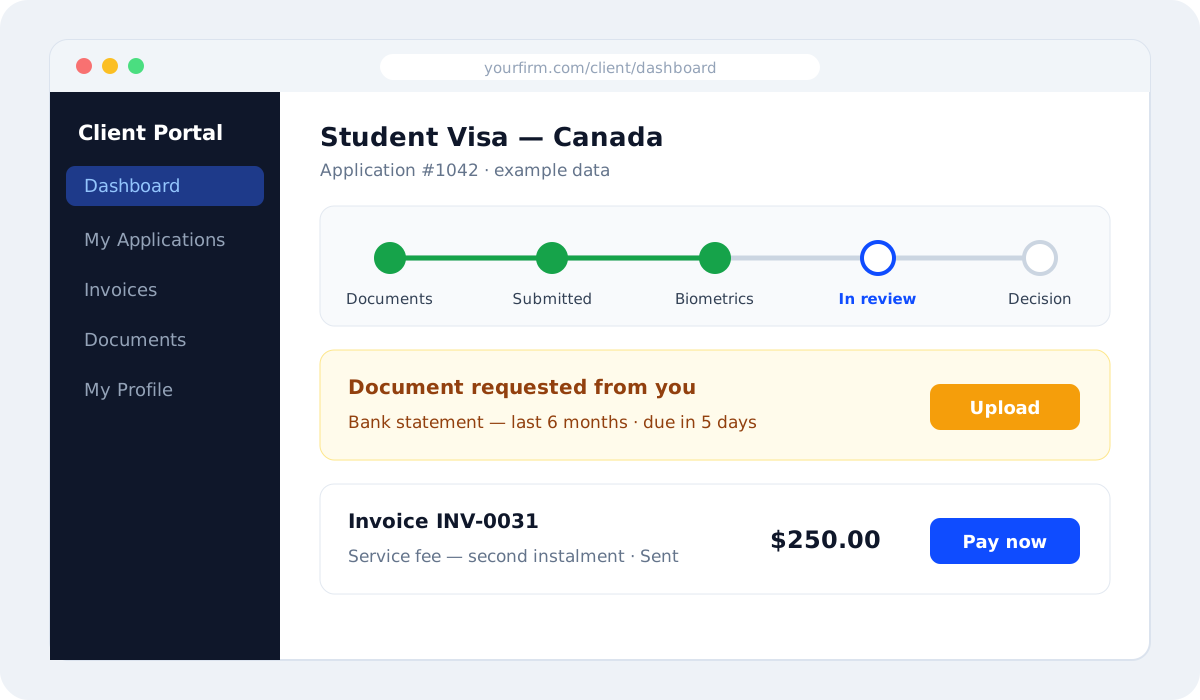
What clients want to see
- Case status — the current stage and what happens next, in plain words.
- What's needed from them — outstanding documents with due dates and an upload button.
- Invoices — what they owe, what they've paid and a way to pay online.
- Appointments — upcoming consultations, biometrics or interviews.
- Their documents — proof that what they sent has been received.
Notice what's missing: internal notes, staff discussions and risk assessments. Those stay inside your team's view.
Benefits for your agency
Fewer interruptions
Status questions are one of the biggest drains on staff time. When clients can check status themselves, those messages drop and your team gets hours back every week.
Documents arrive faster and in the right place
A clear list of what's missing, with an upload button, gets documents in sooner than chasing on WhatsApp — and every upload lands in the right case. Pair the portal with a solid visa document checklist for best results.
Faster payments
Invoices with a "Pay now" button are paid sooner than bank details sent in a chat. Clients also see exactly what they're paying for, which reduces disputes. See how to price visa services and get paid on time.
A more professional image
Clients compare agencies. A branded portal signals that you're organised and transparent — especially important for high-value work like skilled migration and study abroad.
A record of what the client saw
When the client can see requests and due dates, there's less room for "nobody told me". Everything is time-stamped.
Security must-haves
Your clients' passports and financial records deserve better than a shared password. A portal should provide:
- Individual logins for each client — never shared accounts.
- One-time verification codes at sign-in for an extra layer of protection.
- Strict data separation so clients can only ever see their own cases.
- Encrypted connections (HTTPS) on every page.
- Uploads that go straight into the case, not into email inboxes.
A portal that's out of date is worse than no portal. Update the case stage the moment something changes, and clients will trust it.
How to launch a portal with existing clients
- Make sure every active case is up to date before inviting anyone.
- Send a short announcement explaining what clients can do in the portal and how to log in.
- Share a one-page guide with screenshots — or a 60-second video in your clients' language.
- Use the portal in every reply: "You can see the latest status in your portal — here's the link."
- Train staff to update stages and requests in the system instead of messaging updates manually.
An announcement message you can copy
Hi Usman, from today you can follow your visa application online, any time. Your private client portal shows your current stage, any documents we still need (with an upload button), your invoices and upcoming appointments. Sign in at yourfirm.com/client with this email address — you'll receive a one-time code to confirm it's you. We'll keep messaging you as usual for anything urgent. — Your Agency Name
Write stages in plain language
Internal stage names rarely mean anything to clients. A simple translation table keeps everyone consistent:
| Internal stage | What the client should read |
|---|---|
| Docs pending | We're waiting for a few documents from you |
| QA review | We're checking your documents and forms |
| Lodged | Your application has been submitted |
| Bio booked | Your biometrics appointment is booked |
| Awaiting decision | The embassy is reviewing your application |
Common mistakes to avoid
- Letting the portal fall behind reality — clients quickly stop checking it.
- Using internal jargon — "Stage 3: Docs QA" means nothing to a client; "We're reviewing your documents" does.
- Showing internal notes — keep staff comments private.
- Making login complicated — clients should get in within a minute, on their phone.
The VisaPilot CRM client portal
On VisaPilot's Growth and Agency plans, every client gets a secure, mobile-friendly portal. Clients see a dashboard with their applications and status, invoices with a Pay now link, the documents on file, and any document your team has requested — with an upload button and due date. Signing in uses individual accounts with one-time email codes, and clients only ever see their own cases. Because the portal reads directly from your case data, it's always as current as your team's work. Compare what each plan includes on our pricing page.
Frequently asked questions
Do clients actually use client portals?
Yes — when the information is accurate and the login is simple. Mention the portal in every update and clients quickly make it their first stop.
Can clients upload documents from their phone?
They should be able to. A good portal works in any mobile browser, so clients can photograph or upload documents straight from their phone.
Will a portal replace WhatsApp completely?
Not necessarily. Many agencies keep WhatsApp for quick conversations and use the portal for status, documents and payments. We explain this hybrid approach in WhatsApp and Excel vs a visa agency CRM.
Is a client portal safe for passport and bank documents?
A well-built portal with individual logins, one-time codes, data separation and encrypted connections is far safer than sending documents over chat apps or email.
Give your clients answers before they ask. Start a free VisaPilot CRM trial or book a demo to see the client portal from your client's point of view.
Run your visa agency from one dashboard
Cases, documents, deadlines, invoices and a client portal — built for immigration consultants. Try VisaPilot CRM free for 7 days.
Start free trial or book a demo →